%20Migrating%20to%20Webflow_%20A%20Complete%20Guide%20For%20Startups.png)
For a full pricing breakdown, read our Webflow migration cost guide. This one focuses on the process.
You've decided to migrate to Webflow. The question now isn't whether the move is worth it, it's how to make it happen without breaking SEO, blowing past the timeline, or ending up with a CMS your team can't actually use.
Startups pick Webflow for four reasons that keep showing up in migration briefs: marketing can ship pages without pulling engineering time, Core Web Vitals improve out of the box, the CMS scales into programmatic SEO pages, and the platform handles security and hosting without a plugin stack to maintain. Get the migration right and most B2B teams see faster publishing cadence within two weeks of launch and organic traffic gains inside six months.
Get it wrong and you can lose 30 to 60% of organic traffic in the first two weeks. The gap between the two outcomes is entirely about planning: what you audit before the build, how you handle URLs during the move, and what you monitor after launch.
This guide covers when to migrate and when to wait, how to preserve SEO through the move, content mapping and CMS restructuring, real performance benchmarks, and how to pick the team that leads the migration.
For a full pricing breakdown, read our Webflow migration cost guide. This one focuses on the process.
Why startups decide to migrate to Webflow
Startups don't migrate for fun. They migrate because the current site is slowing them down.
Marketing wants to ship without engineers. WordPress theme edits and custom Next.js components all pull engineering time. When marketing needs a landing page approved and engineering has three sprints of backlog, something breaks.
Security debt is piling up. Patchstack identified 6,700 new WordPress vulnerabilities in the first six months of 2025. A separate analysis found 92% of successful WordPress breaches in 2025 originated from plugins and themes, not core software. For B2B SaaS companies selling into regulated industries or enterprise buyers, a compromised marketing site is a commercial event, not a tech incident.
Performance is dragging conversion. Google's research with SOASTA found that as mobile page load goes from 1 second to 3 seconds, the probability of a bounce rises 32%. At 5 seconds it hits 90%. Slow sites lose search traffic and paid ad ROAS.
CMS complexity has hit a wall. Startups outgrow simple blog structures. When you need programmatic pages for use cases, integrations, or industry pages, you need a real CMS.
Fundraising is around the corner. Series A and B rounds often surface how outdated the marketing site looks. Migration timing frequently syncs with fundraising cycles.
When to migrate and when to wait
Migrate now if most of these are true:
→ You're publishing more than two content pieces a week and hitting dev bottlenecks
→ Core Web Vitals are red or yellow on your key landing pages
→ You're about to refresh branding or messaging
→ Your team spends more than 10 hours a month on site maintenance
→ You need programmatic SEO pages your current CMS can't support
Wait if most of these are true:
→ You're pre-seed with less than 10 pages and no traffic
→ Your current site is under a year old and still on-brand
→ You have a major product launch in the next six weeks
→ Nobody on your team has bandwidth to steward the migration
The worst time to migrate is the middle of a product launch or a fundraising cycle. The best time is right after either one closes.
SEO preservation during migration
This is the single biggest fear startups have. It's justified. 17% of site migrations never recover their pre-migration traffic. Botched migrations tank organic traffic 30 to 60% overnight.
Here's what protects the rankings.
301 redirect mapping. Every URL on the old site needs a redirect to its Webflow equivalent. Miss a URL and Google drops it from the index.
Tools worth knowing:
→ Screaming Frog or Sitebulb — crawl the current site and export a URL list
→ WP All Export — pulls WordPress content and metadata as CSV
→ Rapid301 — automates pattern-based redirect generation (95% first-pass accuracy on WordPress-to-Webflow)
.png)
Sample redirect map for a typical B2B SaaS startup:
Most B2B sites carry 3 to 10 URLs per crawled page once you count old campaign URLs, blog archives, and legacy category pages.
Metadata preservation. Meta titles, descriptions, canonical tags, and Open Graph data have to move with the pages. Don't rewrite meta while migrating, that's a redesign task for later. Preserve, then optimize.
Structured data. Schema markup (Organization, BlogPosting, Product, FAQPage) needs to be rebuilt in Webflow's CMS or added via custom code embed blocks. Losing schema loses rich results.
Internal linking. Rebuild the internal link graph in the new site. Google uses internal links to understand site architecture.
XML sitemap and robots.txt. Regenerate both on Webflow, submit the new sitemap in Google Search Console the day you launch, and monitor coverage for the first 30 days.
Content parity. Don't cut content during migration unless it has zero traffic and zero backlinks. Trim later, not during the move.
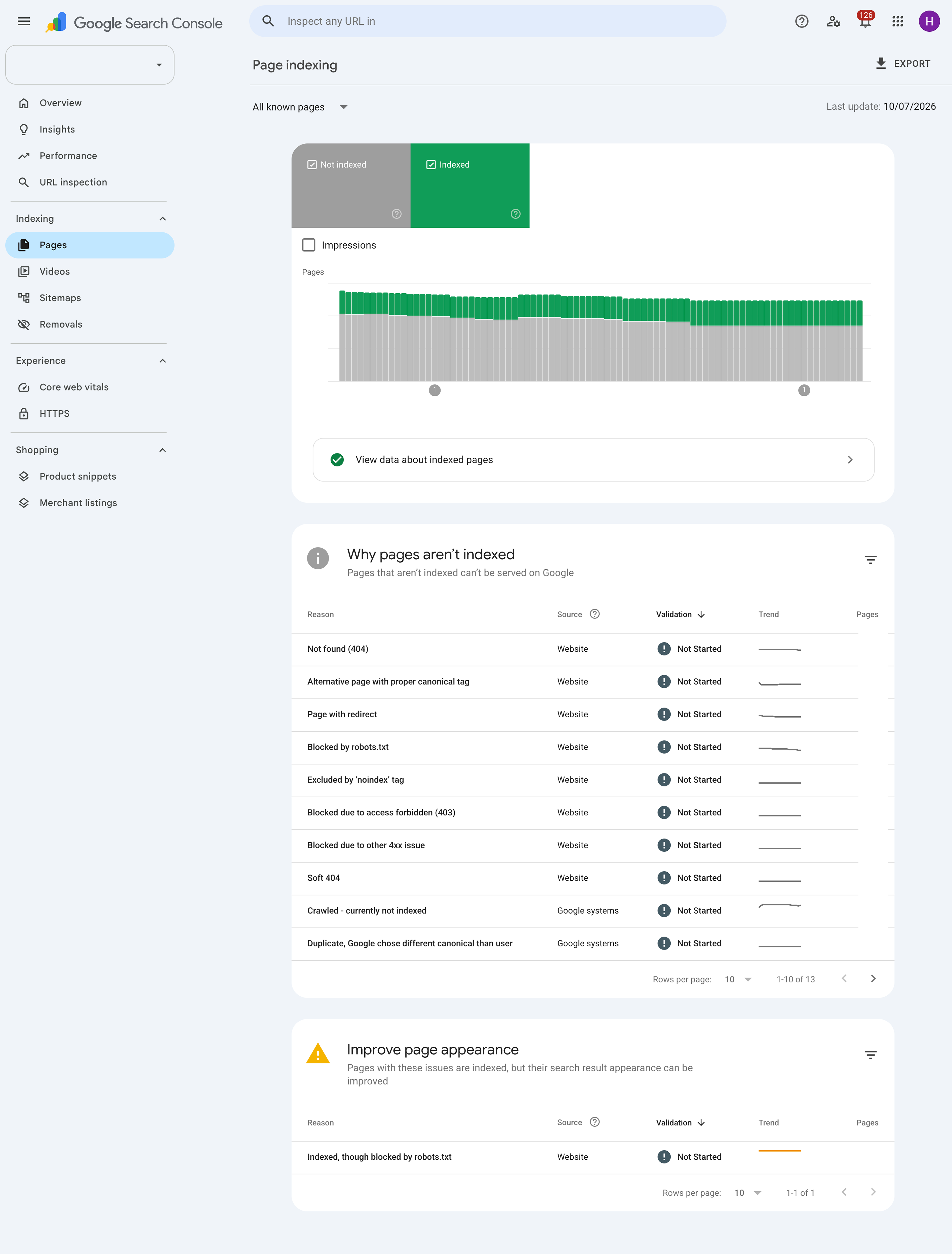
Done properly, migrations should result in a 5 to 15% traffic dip in the first two weeks (normal reindexing), then full recovery by week six.
Content migration and CMS structure
Content migration is where startups most often underestimate the work. Moving 200 blog posts from WordPress to Webflow with formatting intact is a job, not a checkbox.
The three big pieces:
Blog posts and articles. Content, images, author bios, categories, tags, and publish dates all need to move. Rich text formatting often breaks during export/import and needs manual cleanup.
Case studies and portfolio content. Startups often have inconsistent structure across older case studies. This is the moment to standardize the template before migrating, not after.
Resource libraries. Ebooks, webinars, and gated content require gating logic in Webflow (Memberstack, Wized, or native form gating). Plan the gating strategy before the build starts.
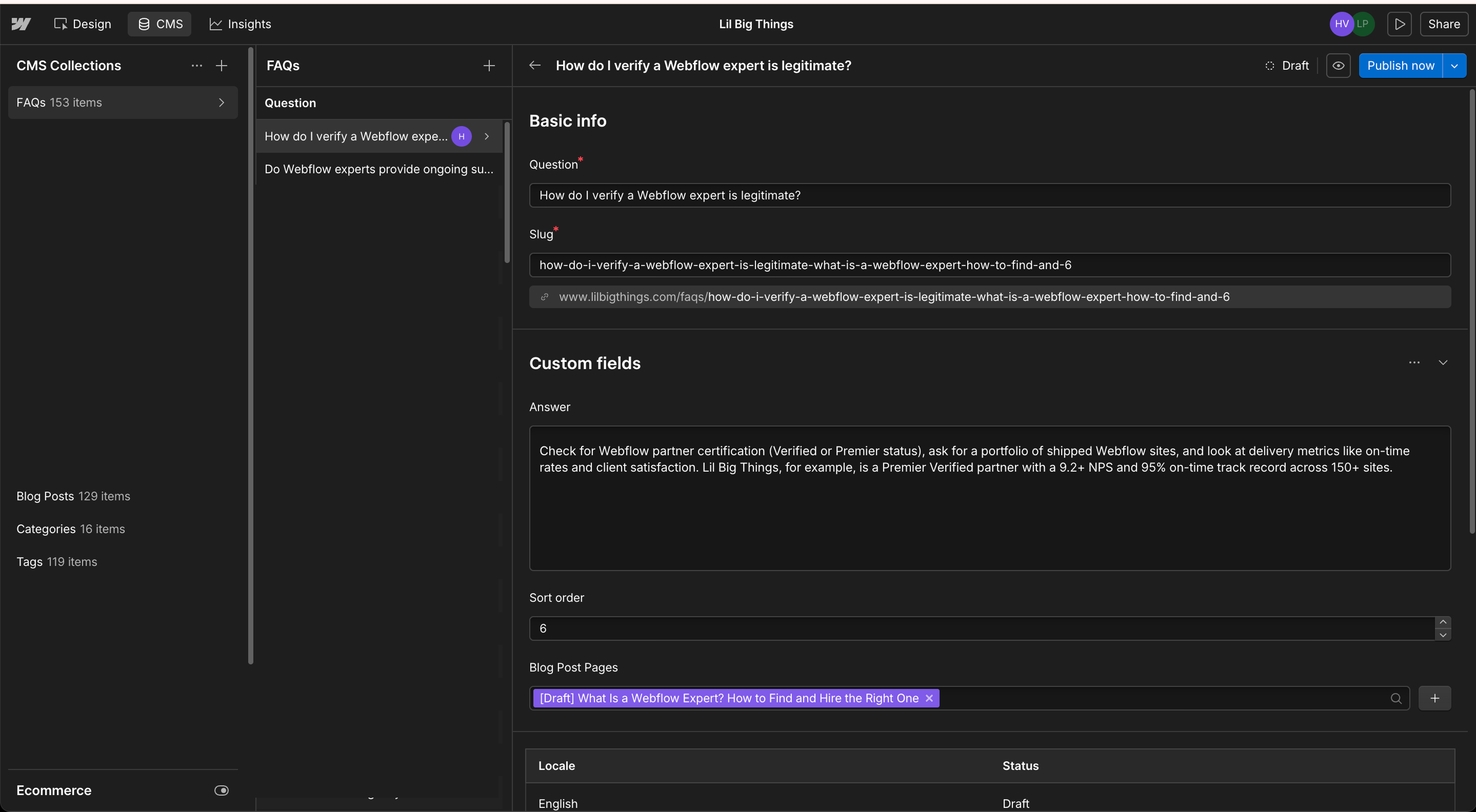
Sample CMS collection schema for a startup blog:
Getting reference fields right before the build starts saves weeks of restructuring later. A blog collection with reference to Authors and Categories is one collection. A blog with author names as plain-text strings is a maintenance nightmare after post 40.
[Checklist]
How to plan content mapping, redirects, and CMS restructuring
Here's the sequence that works. Do it in order, or you'll create rework.
Step 1: Full site crawl. Screaming Frog or Sitebulb. Export URL list, meta titles, meta descriptions, and status codes.
Step 2: Content audit. Tag each URL: keep, consolidate, or kill. Pages with zero traffic and zero backlinks in 12 months can usually be killed. Pages with backlinks but no traffic get redirected to the closest topical match.
Step 3: CMS collection design. Design Webflow CMS collections based on the content types identified in the audit. Confirm reference fields, filtering logic, and URL structure.
Step 4: Redirect map. Every old URL in column A, every new URL in column B. Upload as CSV to Webflow's Publishing settings.
Step 5: Content export and import. WordPress via WP All Export as CSV or XML. Clean in a spreadsheet. Import to Webflow's CMS via CSV.
Step 6: Metadata validation. Spot-check 20 to 30 key pages to confirm meta titles, descriptions, canonical tags, and Open Graph data transferred correctly.
Step 7: Staged launch and monitoring. Launch, submit the sitemap, and monitor Google Search Console daily for the first two weeks.
Common startup migration scenarios
WordPress to Webflow. The most common startup migration. WordPress export gives you an XML file. Content moves cleanly with cleanup of shortcodes and custom fields. Plan 3 to 4 weeks for a typical B2B marketing site.
Wix to Webflow. Wix doesn't offer clean exports. Content moves manually. Design rebuilds from scratch. Longer timelines than WordPress migrations.
Squarespace to Webflow. Squarespace exports blog content and pages as XML. Design rebuild is fully manual. Ecommerce doesn't map directly.
Framer to Webflow. No clean export. Design and CMS both rebuild manually. Startups migrate from Framer when CMS complexity or performance outgrows what Framer supports.
Custom Next.js or Silverstripe to Webflow. Content lives in a database. Migration involves API export or direct database dump, then CSV cleanup, then Webflow import. Design fully rebuilt.
See how these paths play out in our portfolio of Webflow migrations for B2B startups.
Worked example: a 30-page B2B SaaS WordPress migration
Say your startup has a WordPress marketing site with 20 static pages, a blog with 45 posts, 8 case studies, and integrations to HubSpot forms and GA4. Here's what a typical migration looks like end-to-end.
Pre-migration state:
→ Home page LCP: 4.2 seconds
→ Mobile PageSpeed score: 58
→ Marketing publishes 1 to 2 landing pages per month, each requiring 4-6 hours of dev time
→ Zero non-brand keywords in top 10 positions
Migration scope:
→ 20 static pages rebuilt in Webflow
→ 4 CMS collections (Blog, Case Studies, Authors, Categories)
→ 45 blog posts migrated via WP All Export → CSV → Webflow import
→ 8 case studies rebuilt on standardized template
→ HubSpot forms rewired via native integration
→ GA4 reinstalled
→ Redirect map: 68 old URLs → new equivalents
Post-migration outcome (6 months in):
→ Home page LCP: 1.4 seconds
→ Mobile PageSpeed score: 92
→ Marketing publishes 8+ pages per month, zero dev involvement
→ Non-brand keyword rankings improved significantly
This is the shape of what Hubilo, a B2B SaaS company, went through when they migrated from WordPress to Webflow:
"This successful, on-time, on-budget migration ended up driving an 85% increase in speed-to-market and an 89% increase in organic traffic. Hubilo was not ranking for any of their non-brand keywords on page one before the migration and post-migration had over two dozen on page one in just six months."
— Hubilo migration case study, via Zabal Media
What a startup migration timeline actually looks like
A typical 6-week migration for a 30-page B2B SaaS site with a blog:
→ Week 1: Site audit, Screaming Frog crawl, URL inventory, redirect map, CMS architecture design
→ Week 2: Design refactor in Webflow, style guide setup, component library
→ Week 3: Static page builds, initial responsive pass, CMS collection build
→ Week 4: Content migration, blog import via CSV, integration wiring (HubSpot, GA4)
→ Week 5: QA across breakpoints, Core Web Vitals optimization, redirect testing
→ Week 6: DNS cutover, Search Console monitoring, post-launch bug fixes
The single biggest timeline killer isn't the build. It's content readiness and stakeholder feedback cycles. Approve within 2 to 3 business days per review round and you hit the low end. Take a week or two per review and you're at 10+ weeks.
Performance benchmarks before and after migration
Startups usually see measurable performance gains after moving to Webflow, especially coming off shared WordPress hosting.
Typical performance shifts:
→ Largest Contentful Paint (LCP): improves 30 to 50%
→ Interaction to Next Paint (INP): improves 20 to 40%
→ Cumulative Layout Shift (CLS): improves 15 to 30%
→ Total page weight: drops 40 to 60% (from removing plugin bloat)
→ Time to First Byte (TTFB): drops noticeably from Webflow's CDN infrastructure
Gains only show up if the build is done properly. Bloated Figma files ported without cleanup, unoptimized custom code, and heavy third-party scripts will slow a Webflow site down just like any other platform.
Choosing the right Webflow agency to lead the process
Startups have three options: freelancer, agency, or in-house. For most, a Webflow-specialist agency is the right answer, especially if the migration involves SEO preservation, CMS restructuring, or a design refresh.
Pick a Webflow-specialist agency if most of these are true:
→ Your site has 30+ pages with a real CMS
→ SEO preservation is critical (you have measurable organic traffic)
→ You're integrating HubSpot, Salesforce, or a custom analytics stack
→ Your team can't afford to babysit the build week to week
→ Launch date is tied to a fundraising or product event
What to look for in a Webflow agency:
→ Webflow Premier Verified or Certified Partner status (top 1% of Webflow agencies globally)
→ 2 to 3 published migration case studies from your source platform
→ SEO track record with named, verifiable client outcomes
→ CMS depth on complex reference fields and dynamic filtering
→ Post-launch support included, not billed separately
Startups often default to a generalist web agency because they recognize the name. Webflow-native agencies ship faster, cleaner, and with better SEO outcomes. Migration is a specialty inside a specialty — it's not the same as a fresh Webflow development build. Ask for migration case studies specifically, not portfolio work.
→ See what a Webflow-native migration process looks like
Frequently Asked Questions
Small marketing sites (10 to 20 pages) take 2 to 4 weeks. Mid-sized B2B SaaS sites (20 to 60 pages, moderate CMS) run 4 to 8 weeks. Timelines depend more on content readiness and stakeholder feedback speed than on build complexity.
Not if the migration is done properly. Full 301 redirect mapping, preserved metadata, structured data rebuilt, and sitemap submitted on launch day. Most sites see a 5 to 15% traffic dip in the first two weeks (normal reindexing), then full recovery by week six.
Yes, with cleanup. WordPress exports as XML, which includes posts and metadata. Images, rich text blocks, and embedded content usually need manual cleanup. Budget 10 to 30 hours per 100 posts.
Anywhere from $8,000 for a small marketing site to $50,000+ for larger sites with heavy CMS or design refreshes. Full breakdown in our Webflow migration cost guide.
Depends on your team's Webflow experience and your SEO stakes. If you have shipped multiple Webflow sites and your traffic is under 5,000 monthly visits, DIY can work. If SEO matters or you have complex CMS needs, a Webflow agency is worth it.